
Choosing the Right UI/UX Design Services for Your SaaS Product

Every year, thousands of SaaS products are launched into an increasingly crowded marketplace. Some of them gain rapid traction, delight their users, and scale into industry leaders. Others — despite having powerful features and solid engineering — struggle to retain users, burn through their budgets on constant redesigns, and eventually fade into irrelevance. The single biggest difference between these two outcomes often comes down to one thing: the quality of their user experience.
The numbers paint a stark picture. Research consistently shows that every dollar invested in UX design returns between $2 and $100 in business value. On the flip side, nearly 90% of users say they will stop using an application after a poor experience, and 70% of online businesses fail because of poor usability. For SaaS companies operating on subscription-based revenue models, these statistics are not just interesting — they are existential. A confusing onboarding flow or a frustrating dashboard can mean the difference between a customer who stays for years and one who churns within the first week.
This is precisely why choosing the right UI/UX design services for your SaaS product is one of the most consequential decisions you will make as a founder, product manager, or technology leader. The right design partner will not just make your product look good — they will make it intuitive, efficient, and genuinely enjoyable to use. They will reduce your customer acquisition costs, increase your trial-to-paid conversion rates, lower your churn, and ultimately drive sustainable revenue growth.
But here is the challenge: the market for UI/UX design services is vast and overwhelming. There are thousands of agencies, freelancers, and studios, each claiming to offer world-class design. How do you separate the truly exceptional partners from the rest? How do you evaluate whether a design agency understands the unique complexities of SaaS products — the multi-role dashboards, the intricate onboarding sequences, the data-heavy interfaces, and the need for scalable design systems?
That is exactly what this comprehensive guide will help you do. Whether you are an early-stage startup building your first MVP, a growth-stage company looking to redesign your existing product, or an enterprise seeking to modernize your SaaS platform, this guide will walk you through everything you need to know about selecting the right UI/UX design services. We will cover what these services include, why they matter for SaaS success, the exact criteria you should use to evaluate design partners, the design process you should expect, common challenges and how to overcome them, how to measure the ROI of your UX investment, and the future trends shaping SaaS design in 2026 and beyond.
At DigiOxide Technologies, we have spent over eight years designing and building scalable SaaS platforms, mobile applications, and AI-powered digital solutions for startups and enterprises worldwide. We have seen firsthand what separates great SaaS UX from mediocre design, and we are sharing that knowledge with you in this guide. Let’s dive in.
What Are UI/UX Design Services and Why Do SaaS Products Need Them?
Before diving into how to choose the right design partner, it is essential to understand what UI/UX design services actually encompass and why they are particularly critical for SaaS products.
Understanding UI vs. UX: Two Sides of the Same Coin
UI and UX are often mentioned together, but they represent two distinct — though deeply interconnected — disciplines.
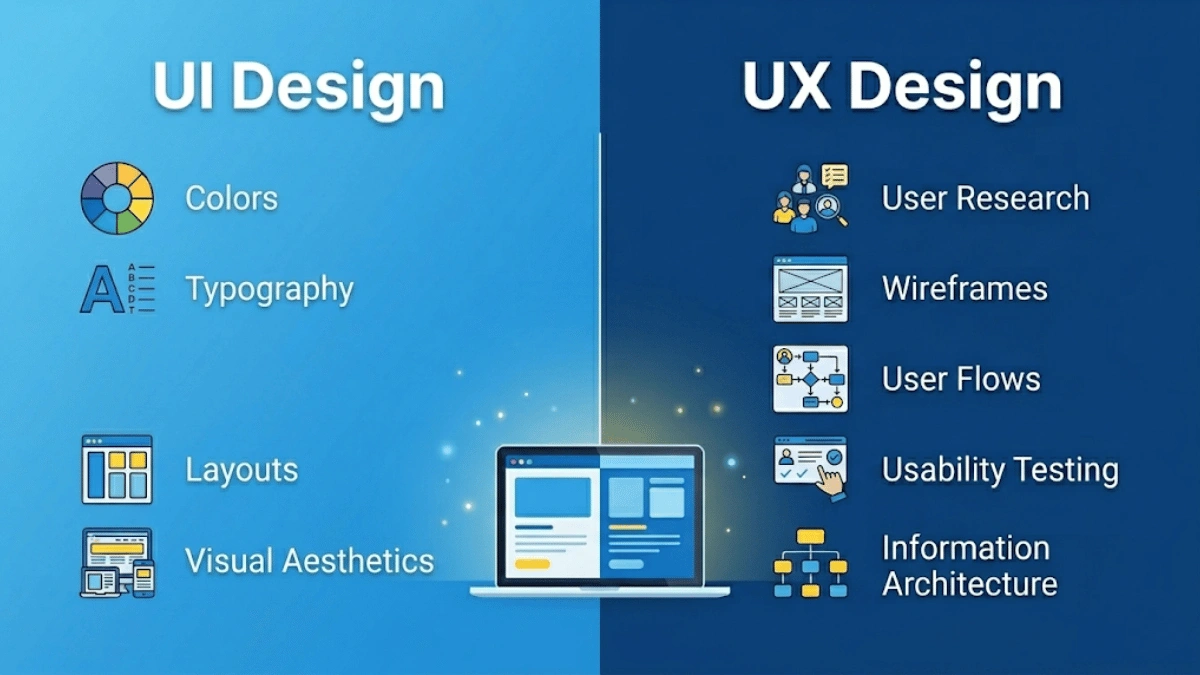
User Interface (UI) Design is the visual layer of your product. It deals with everything users see and interact with on the screen: the layout of buttons, the color schemes, the typography, the icons, the spacing, the animations, and the overall visual aesthetics. A great UI makes a product feel polished, professional, and visually coherent. It creates an emotional connection with users and reinforces your brand identity.
User Experience (UX) Design goes much deeper. It is the strategic discipline that governs how a product works, how users navigate through it, and how effectively it helps them accomplish their goals. UX design involves understanding user behaviors, motivations, and pain points through research. It encompasses the entire journey a user takes — from the moment they discover your product to the moment they become a loyal, paying customer. UX design includes information architecture, interaction design, usability engineering, and user research.
Think of it this way: UI is how the product looks, and UX is how the product feels and functions. A product can have a beautiful UI but terrible UX if users cannot find what they need or accomplish their tasks efficiently. Conversely, a product with outstanding UX but poor UI may function well but fail to inspire confidence or engagement. The best SaaS products excel at both.
Core Components of Professional UI/UX Design Services
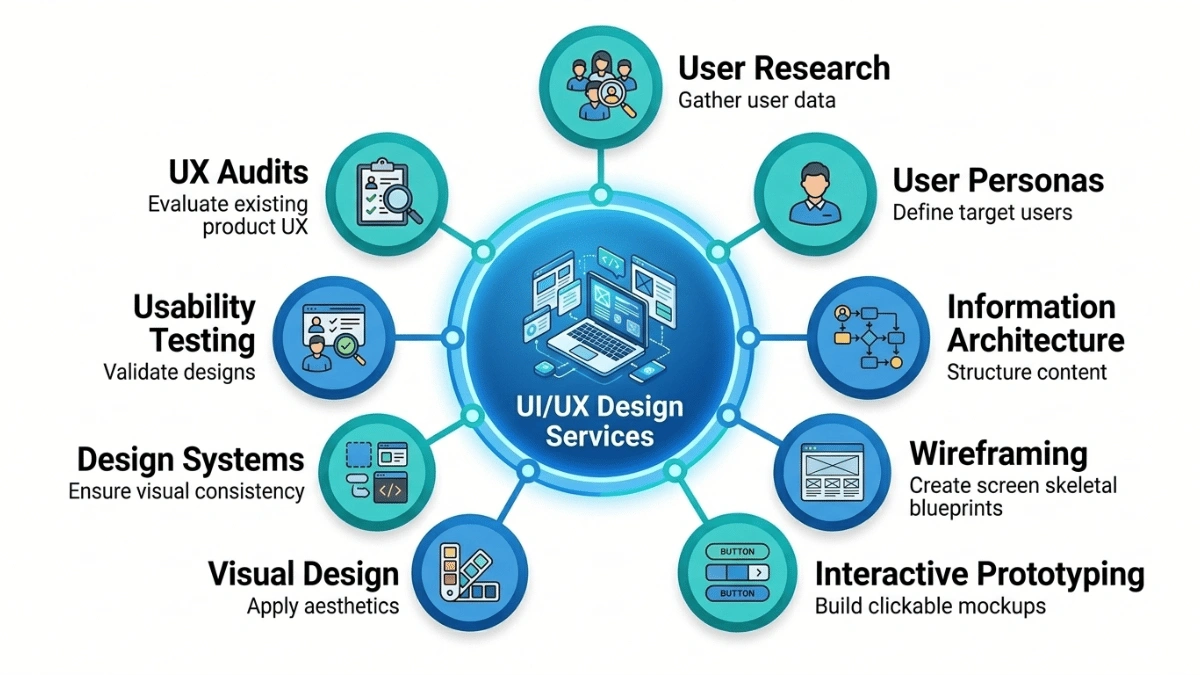
When you hire a professional UI/UX design agency, you should expect a comprehensive suite of services that typically includes the following:
- User Research: This involves conducting interviews, surveys, analytics reviews, and competitive analysis to deeply understand your target users — their goals, frustrations, workflows, and decision-making patterns.
- User Personas and Journey Maps: Based on research, the team creates detailed fictional profiles representing your key user segments and maps out their complete journey through your product, identifying pain points and opportunities at every touchpoint.
- Information Architecture (IA): This is the structural blueprint of your product — how content and features are organized, labeled, and connected to ensure users can navigate intuitively.
- Wireframing: Low-fidelity skeletal layouts that define the structure and hierarchy of each screen without visual design details, allowing rapid iteration on layout and flow.
- Interactive Prototyping: Clickable, high-fidelity prototypes that simulate the real product experience, enabling testing and validation before any code is written.
- Visual and UI Design: The creation of the final visual layer — colors, typography, iconography, imagery, micro-interactions, and animations that bring the interface to life.
- Design Systems and UI Kits: A shared library of reusable components, patterns, tokens, and guidelines that ensure visual and functional consistency as your product scales across features and platforms.
- Usability Testing: Real users are observed as they interact with your product or prototype, generating actionable insights about what works, what confuses, and what needs improvement.
- UX Audits: A systematic evaluation of an existing product against usability heuristics, industry best practices, and user feedback to identify areas for improvement.
Why SaaS Products Need Specialized UI/UX Design
SaaS products are fundamentally different from brochure websites, e-commerce stores, or simple mobile apps. They present unique design challenges that demand specialized expertise:
- Complex Workflows: SaaS products often involve multi-step processes, conditional logic, and interconnected features that must be simplified without losing functionality.
- Dashboard Navigation: Most SaaS products feature data-heavy dashboards that need to present complex information in a clear, digestible, and actionable format.
- Tiered User Roles: Different user types (administrators, managers, team members, clients) often need different views, permissions, and experiences within the same product.
- Onboarding Flows: SaaS products must guide new users from sign-up to value realization as quickly and smoothly as possible to reduce time-to-value and improve activation rates.
- Scalability Requirements: As features are added over months and years, the design must remain consistent, coherent, and manageable through design systems and component libraries.
- Subscription Retention Pressure: Unlike one-time purchases, SaaS revenue depends on users continuing to find value month after month. The UX must continuously evolve to meet growing user expectations.
A generic design agency that primarily works on marketing websites or simple apps will likely struggle with these SaaS-specific complexities. That is why it is critical to choose a design partner with proven SaaS experience.
Why Great UX Design Is the Backbone of Every Successful SaaS Product
Understanding that UX matters is one thing. Understanding exactly how and why it impacts your business metrics is what turns UX from a “nice to have” into a strategic business imperative.
First Impressions Drive User Adoption
In the SaaS world, first impressions are everything. When a new user signs up for your product — whether through a free trial, a freemium plan, or a demo — they are forming their judgment within the first few minutes. Research shows that users form an opinion about a digital product within 50 milliseconds of their first interaction. If your onboarding experience is confusing, cluttered, or overwhelming, users will leave before they ever experience the value your product offers.
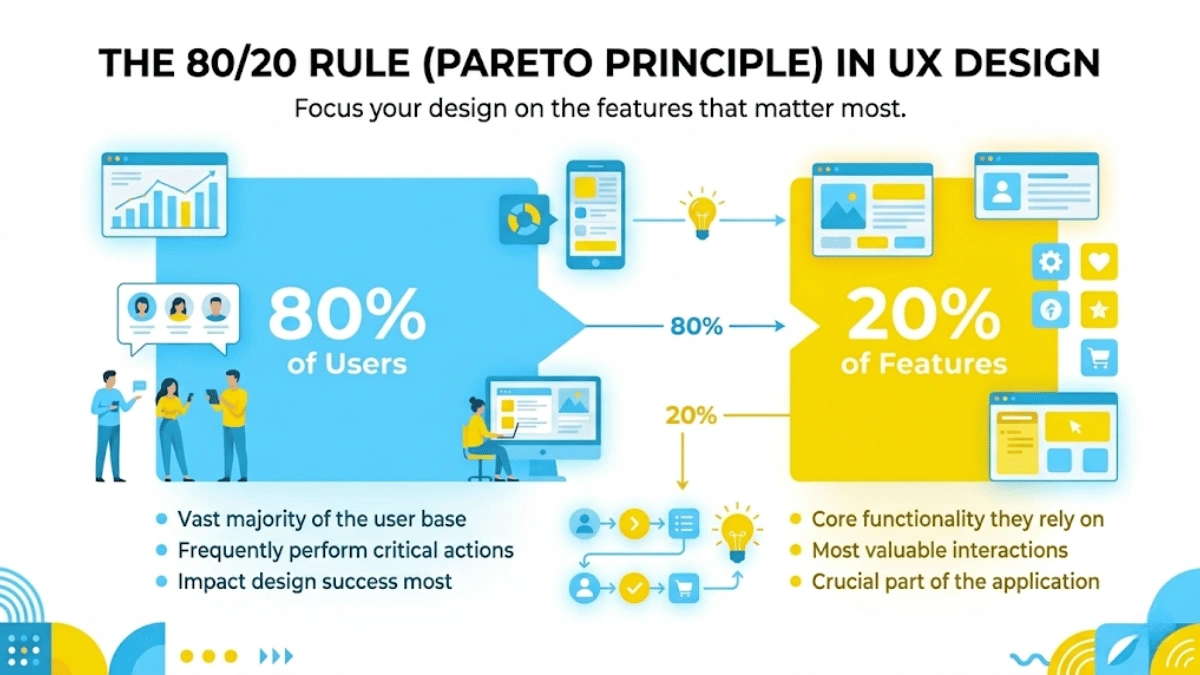
This is where the 80/20 rule in UX becomes critical. The Pareto Principle, applied to UX design, states that approximately 80% of your users will interact with only about 20% of your product’s features. This has a profound implication for design: rather than trying to showcase every feature during onboarding, smart UX design identifies and prioritizes the critical 20% of features that deliver the most value to the most users. The onboarding flow should guide users directly to those high-impact features, helping them experience their “aha moment” as quickly as possible.
Consider the onboarding experience of a product like Slack. When you first sign up, Slack does not bombard you with every single feature it offers. Instead, it focuses on getting you into a workspace, sending your first message, and inviting a team member. These three simple actions demonstrate Slack’s core value immediately, and the rest of the features are introduced gradually over time through contextual prompts and progressive disclosure.
This approach dramatically increases activation rates and sets the foundation for long-term retention. A SaaS product that nails its onboarding UX can see trial-to-paid conversion rates improve by 20% to 50% or more.
UX Directly Impacts Business-Critical Metrics
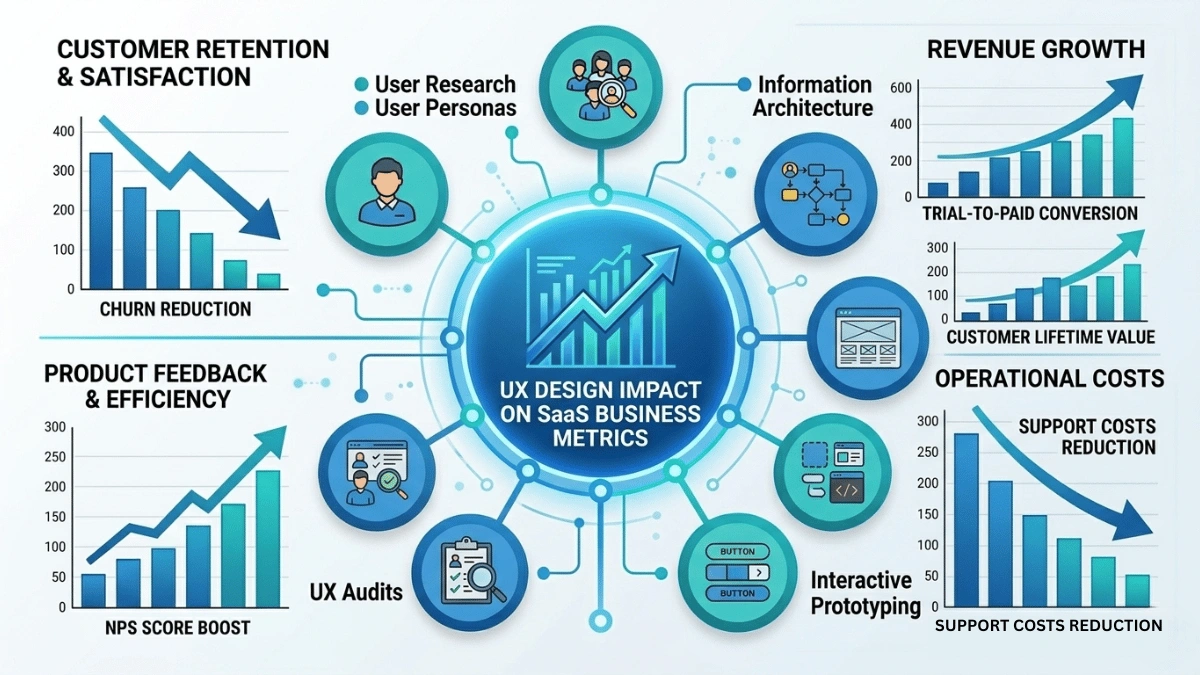
UX design is not an abstract art — it is a measurable business function that directly influences your most important KPIs:
- Churn Reduction: Poor UX is one of the top reasons SaaS customers cancel their subscriptions. Users who find a product frustrating, confusing, or inefficient will seek alternatives. Improving UX can reduce churn rates significantly, which has a compounding effect on revenue because retaining existing customers is far cheaper than acquiring new ones.
- Trial-to-Paid Conversion: For SaaS products offering free trials or freemium plans, the UX of the trial experience is the single biggest lever for conversion. If users can quickly understand and experience the product’s value during the trial period, they are far more likely to become paying customers. A well-designed onboarding flow, clear feature presentation, and intuitive navigation can dramatically lift conversion rates.
- Customer Lifetime Value (CLV): Great UX does not just prevent churn — it encourages users to explore more features, upgrade their plans, and become advocates for your product. Users who have a positive experience are more likely to expand their usage, purchase add-ons, and recommend the product to others, all of which increase their lifetime value.
- Net Promoter Score (NPS): NPS measures how likely users are to recommend your product to others. Products with excellent UX consistently score higher on NPS, which translates directly into organic growth through word-of-mouth referrals.
- Support Cost Reduction: A significant percentage of customer support tickets originate from usability issues rather than actual bugs. An intuitive, well-designed product reduces the volume of “how do I do this?” support requests, freeing up your support team to focus on complex issues and reducing operational costs.
The key takeaway here is that UX design decisions should be data-driven. Every design choice — from the placement of a button to the structure of a navigation menu — should be informed by user research, analytics, and testing rather than personal preferences or assumptions. Design agencies that combine the power of human-centered design with market research, analytics, and modern AI tools are the ones that deliver measurable, impactful results.
Gaining a Competitive Edge Through Design
In today’s SaaS market, features alone are rarely a sustainable competitive advantage. Most SaaS categories have multiple products offering similar core functionalities. What differentiates the market leaders from the rest is the quality of their user experience.
Look at the most successful SaaS products of the past decade: Slack, Notion, Figma, Canva, Airtable, and Linear. Each of these products entered markets that already had established competitors offering similar functionality. What set them apart was not just what they could do, but how delightfully easy and intuitive they made it to do it. Figma did not invent design collaboration — but it made it seamless. Notion did not invent note-taking or project management — but it made it flexible and enjoyable. Canva did not invent graphic design — but it made it accessible to non-designers.
On the flip side, ignoring UX has real and expensive consequences. Products with poor UX face higher churn, more negative reviews, increased support costs, slower word-of-mouth growth, and ultimately lower market valuation. In many cases, the cost of fixing bad UX after launch is five to ten times higher than investing in good UX from the beginning.
Strong UX design drives customer acquisition, engagement, and retention. It is not a cost center — it is a growth engine. And the companies that recognize this early are the ones that dominate their markets.
How to Choose the Right UI/UX Design Services for Your SaaS Product
Now that we have established why UX matters, let us get into the practical framework for evaluating and selecting the right UI/UX design partner for your SaaS product. This is the most important section of this guide — treat it as a checklist you can use when vetting agencies, studios, and freelancers.
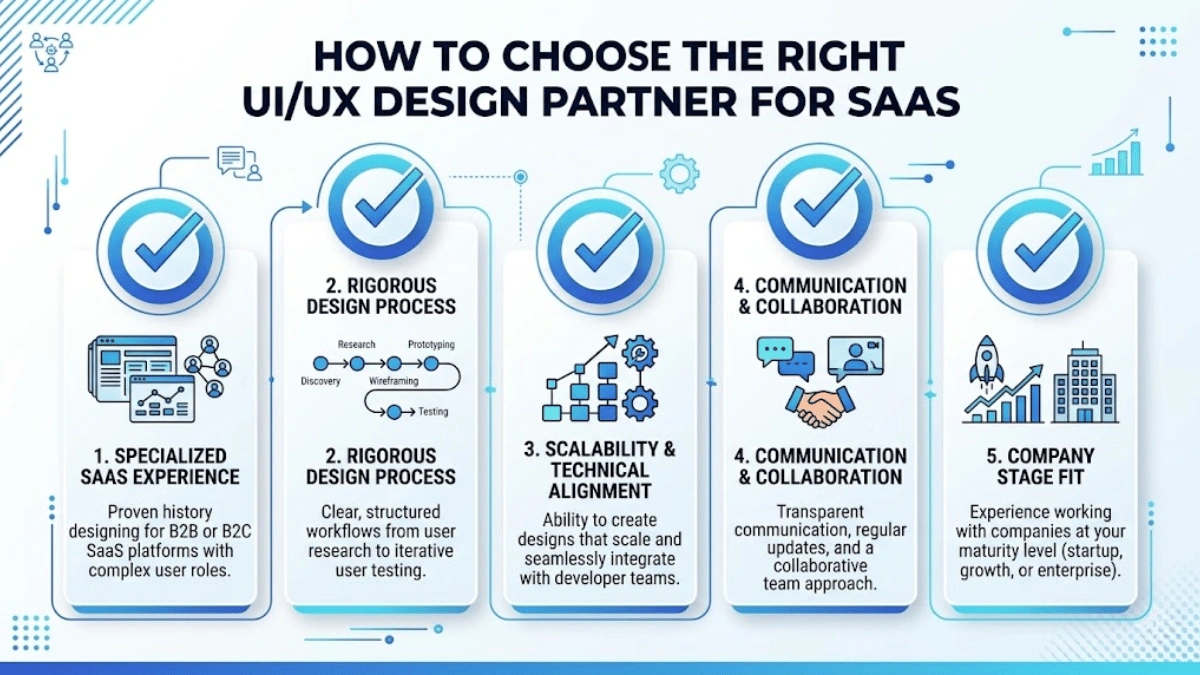
1. Look for Specialized SaaS Experience (Not Just Pretty Portfolios)
This is the single most important criterion. Designing for SaaS is fundamentally different from designing marketing websites, e-commerce platforms, or consumer mobile apps. SaaS design involves complex workflows, multi-role access systems, data visualization, dashboard design, onboarding optimization, and long-term scalability.
When evaluating a design agency’s portfolio, do not just look at visual aesthetics. Instead, look for evidence of:
- Complex Dashboard Design: Have they designed data-heavy dashboards that present analytics, reports, or operational data in a clear and actionable way? Dashboard design is one of the most challenging aspects of SaaS UX, and experience here is a strong signal of SaaS competence.
- Multi-Role User Interfaces: Have they built interfaces that serve different user types — such as administrators, managers, and end users — within the same product? This requires understanding role-based access control and how to tailor the experience for each persona.
- Onboarding Flow Design: Have they designed onboarding sequences that guide new users from sign-up to value realization? Look for evidence of progressive onboarding, interactive walkthroughs, and contextual help patterns.
- Design System Creation: Have they built comprehensive design systems with reusable components, design tokens, and documentation? This is essential for SaaS products that will grow and evolve over time.
Most importantly, look for case studies over portfolios. A beautiful screenshot tells you nothing about business impact. What you want to see are case studies that demonstrate measurable results: lower churn rates, higher trial-to-paid conversion, improved task completion rates, reduced support tickets, or faster user onboarding. A design partner that can show you how their work moved specific business metrics is far more valuable than one that can only show you pretty screens.
2. Evaluate Their Design Process and Methodology
A great design agency does not just produce deliverables — they follow a rigorous, repeatable process that ensures every design decision is grounded in research and validated through testing.
When interviewing potential design partners, ask detailed questions about their process:
- How do they start a project? The answer should involve some form of discovery or research phase — stakeholder interviews, user interviews, analytics review, and competitive analysis. If they jump straight into wireframes or visual design without research, that is a red flag.
- How do they validate their designs? The answer should include usability testing with real users, A/B testing, or at minimum, structured internal reviews. Design decisions should be backed by evidence, not just opinions.
- How do they iterate? Good agencies work in iterative cycles, refining their designs based on feedback and testing results. Ask how many rounds of iteration they typically include and how they handle scope changes.
- Do they combine human-centered design with modern tools? The best agencies in 2026 are combining traditional UX research methods with AI-powered tools for pattern analysis, automated usability testing, heatmap analytics, and sentiment analysis. Ask whether they leverage these tools to enhance their process.
A well-defined process is your insurance policy against subjective, opinion-driven design. It ensures that the final product is designed for your users, not just for the designer’s preferences.
3. Check for Scalability and Technical Alignment
SaaS products are not static — they evolve continuously with new features, integrations, and user feedback. Your design partner must understand this reality and design with scalability in mind.
There are several key areas to evaluate:
- Design Systems Expertise: Can they build a comprehensive design system that serves as the single source of truth for your product’s visual and interaction patterns? A design system ensures that as your product grows, new features maintain visual and functional consistency without requiring a full redesign each time.
- Developer Collaboration: How do they work with development teams? The best design agencies understand technical constraints and opportunities. They produce specifications, component documentation, and assets that developers can implement accurately. Look for agencies that practice design-led development — where design and engineering work as an integrated team rather than in separate silos.
- Platform and Framework Awareness: Do they understand the technical platforms your product is built on? Whether you are using React, Angular, Vue, Flutter, or native mobile technologies, designers who understand the capabilities and limitations of your tech stack will produce designs that are both beautiful and feasible to implement.
- Responsive and Cross-Platform Design: SaaS products are used across desktops, tablets, and mobile devices. Your design partner should be experienced in creating responsive designs that adapt gracefully to different screen sizes and input methods.
4. Assess Communication and Collaboration Style
The relationship between you and your design partner is a collaboration, not a transaction. The quality of communication can make or break the engagement, regardless of how talented the designers are.
Here is what to look for:
- Regular Update Cadence: Do they offer daily or weekly status updates? Can you expect regular check-ins, sprint reviews, or demo sessions? Transparency and visibility into progress are essential.
- Communication Tools: What tools do they use? Most modern design teams operate through a combination of Figma for design collaboration, Slack or Teams for real-time communication, Jira or Linear for project management, and Loom or similar tools for asynchronous video updates. Ensure their tools align with your workflow.
- Time Zone Compatibility: If you are based in the USA and your design partner is in a different time zone, how do they handle the overlap? The best global agencies structure their schedules to provide meaningful overlap with their clients’ business hours.
- Feedback Integration: How do they handle feedback? A good agency will have a structured process for collecting, organizing, and acting on your feedback. They should welcome constructive criticism and incorporate it efficiently without derailing timelines.
- Stakeholder Management: For larger organizations, the design partner should be capable of managing input from multiple stakeholders — product managers, engineers, executives, and end users — without losing focus on the user-centered design goals.
5. Match the Partner to Your Company Stage
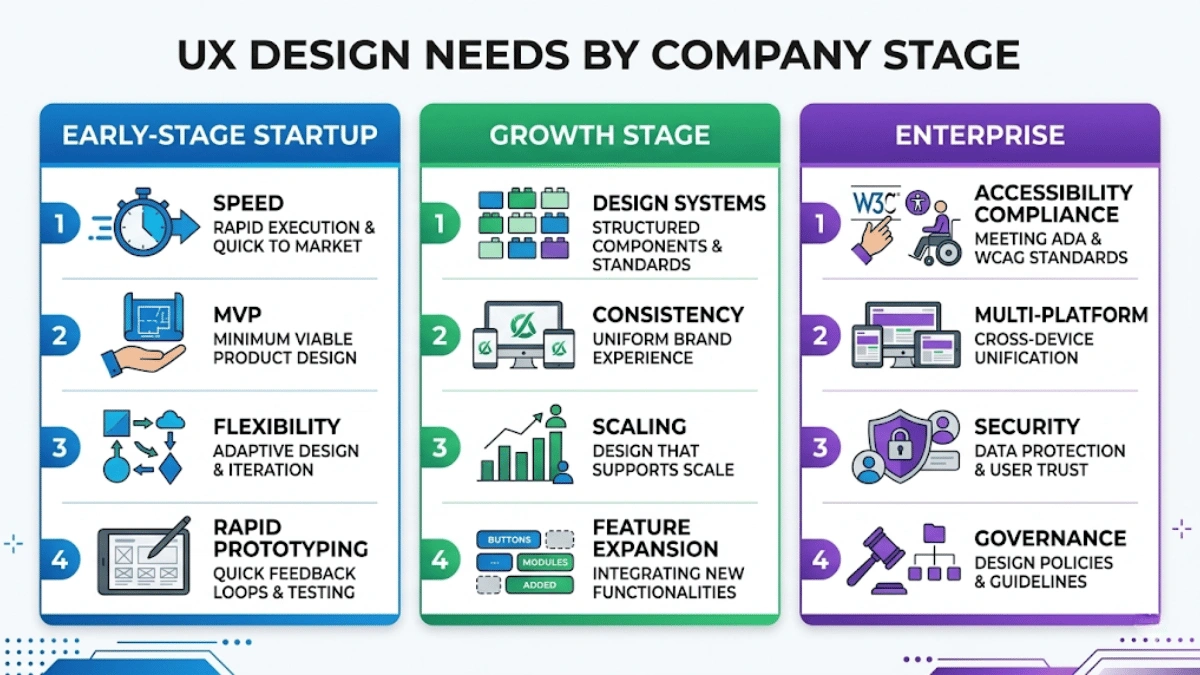
One of the most overlooked factors in choosing a design partner is aligning their capabilities with your company’s current stage and needs. What an early-stage startup needs from a UX partner is very different from what a mature enterprise requires.
Early-Stage Startups (Pre-Product-Market Fit): At this stage, speed and flexibility are paramount. You need a partner who can work fast, iterate rapidly, and help you build a Minimum Viable Product (MVP) that tests your core value proposition with real users. The focus should be on validating assumptions, not on pixel-perfect design. Look for partners experienced in lean UX, rapid prototyping, and MVP development. They should be comfortable with ambiguity and willing to pivot quickly based on user feedback.
Growth-Stage Companies (Post-Product-Market Fit): Once you have validated your product and are scaling, the design challenges shift. You need consistency across a growing feature set, a robust design system, and the ability to handle complex feature additions without breaking the existing experience. Look for partners with strong design system expertise, experience managing design at scale, and the ability to balance new feature design with ongoing UX optimization of existing features.
Enterprise Organizations: Enterprise SaaS products often have additional requirements including strict accessibility compliance (WCAG 2.1 AA or higher), multi-platform support, complex permission systems, integration with enterprise tools, and rigorous security review of design deliverables. Your design partner should have experience navigating these requirements and working within enterprise governance frameworks.
The SaaS UX Design Process: From Research to Launch
Understanding what a professional SaaS UX design process looks like will help you set expectations, evaluate proposals, and ensure you are getting comprehensive service from your chosen partner. While every agency has their own variation, a robust SaaS UX process typically follows these five key phases.
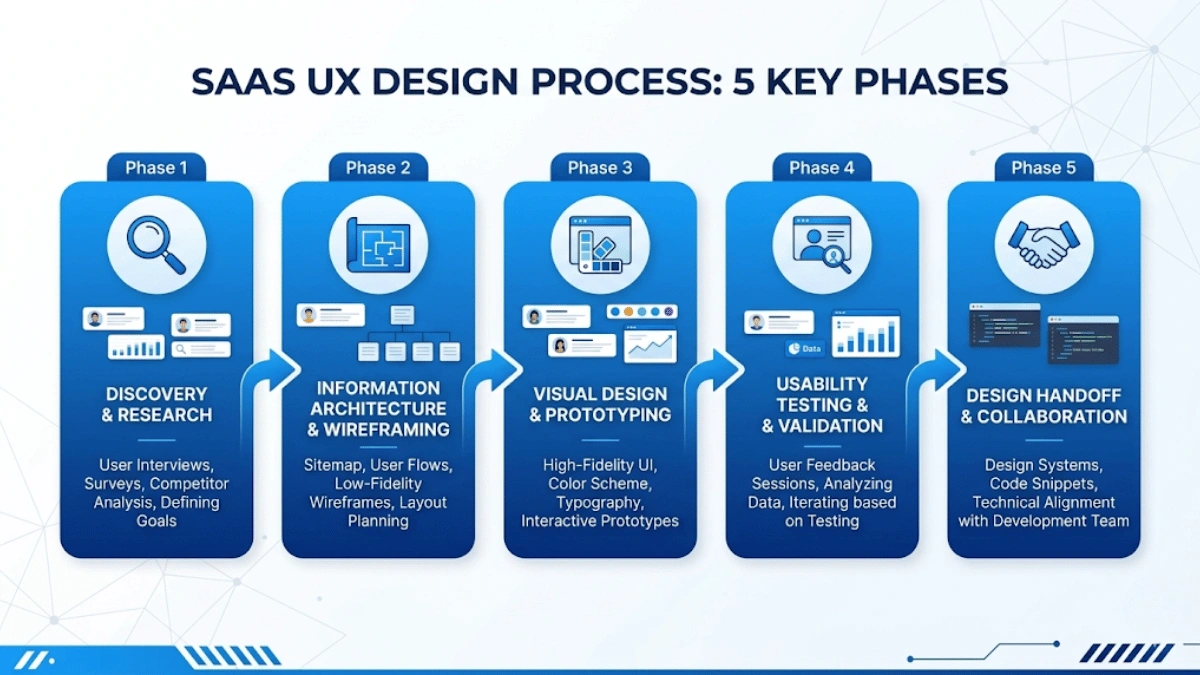
Phase 1: Discovery and User Research
Every great design project begins with understanding — understanding your business goals, your users, your market, and your constraints. The discovery phase is the foundation upon which every subsequent design decision will be built.
A thorough discovery phase typically includes:
- Stakeholder Interviews: The design team meets with your key stakeholders — founders, product managers, engineers, sales teams, and customer success teams — to understand the business context, strategic goals, technical constraints, and existing pain points.
- User Interviews and Surveys: Direct conversations with your actual users (or target users) to understand their needs, goals, frustrations, workflows, and decision-making processes. This is the most valuable form of research because it reveals the “why” behind user behavior.
- Analytics Review: If you have an existing product, the team will analyze your usage data — user flows, drop-off points, feature adoption rates, heatmaps, and session recordings — to identify specific areas of friction.
- Competitive Analysis: A systematic review of how competing products handle similar use cases, identifying both best practices to learn from and opportunities to differentiate.
- User Persona Development: Based on research findings, the team creates detailed personas representing your key user segments, including their goals, pain points, technical proficiency, and usage contexts.
- User Journey Mapping: Visual maps that trace the complete user journey from awareness to activation to retention, identifying every touchpoint, emotion, and opportunity for improvement.
This phase typically takes two to four weeks depending on the complexity of the project. It is the most important phase because rushing through it — or skipping it altogether — almost always leads to designs that look good on paper but fail with real users.
Phase 2: Information Architecture and Wireframing
With research insights in hand, the team moves into structuring the product. This phase is about organizing complexity into clarity.
- Information Architecture (IA): The IA defines the structural organization of your product — how screens, sections, and features relate to each other, how navigation works, and how users will move between different areas of the product. For complex SaaS products with dozens or hundreds of features, getting the IA right is critical. A well-structured IA reduces cognitive load, minimizes the number of clicks needed to accomplish tasks, and makes the product feel intuitive even to new users.
- Wireframing: Wireframes are low-fidelity visual representations of each screen, showing the layout, hierarchy, and content placement without visual design details like colors or images. They allow the team to rapidly explore and iterate on different layout options. Wireframes are particularly valuable because they focus attention on structure and usability rather than aesthetics, which helps stakeholders provide more useful feedback at this stage.
- User Flows and Interaction Models: Detailed diagrams showing how users navigate through specific tasks — from signing up, to completing onboarding, to performing key actions within the product. These flows ensure that every user path is considered and optimized, including edge cases and error states.
This phase typically takes two to three weeks. The deliverables from this phase serve as the blueprint that guides all subsequent visual design and development work.
Phase 3: Visual Design and Interactive Prototyping
This is where the product begins to look and feel real. The visual design phase transforms wireframes into polished, branded interfaces that reflect your product’s identity and delight your users.
- High-Fidelity Mockups: Pixel-perfect screen designs showing the final visual treatment of every screen, including colors, typography, iconography, imagery, spacing, and micro-interactions. These mockups should align with your brand identity while following UX best practices for readability, accessibility, and visual hierarchy.
- Interactive Prototypes: Clickable prototypes built in tools like Figma or Framer that simulate the actual product experience. Users (and stakeholders) can click through the prototype as if it were a real application, making it much easier to evaluate the design’s usability and flow before committing to development.
- Design System Development: Alongside the screens, the team builds a comprehensive design system — a library of reusable components (buttons, forms, cards, modals, tables, navigation elements, etc.), design tokens (colors, spacing, typography scales), and usage guidelines. This system becomes the authoritative reference for both designers and developers, ensuring consistency as the product grows.
- Micro-Interactions and Animation: Thoughtful animations for transitions, loading states, hover effects, success confirmations, and error messages. These small details significantly enhance the perceived quality and responsiveness of the product.
This phase typically takes three to six weeks depending on the number of screens and complexity. The result is a complete visual representation of the product that can be tested, reviewed, and refined.
Phase 4: Usability Testing and Validation
Design is not complete until it has been validated with real users. Usability testing is the process of observing actual users as they attempt to complete tasks within your prototype, identifying where they struggle, where they succeed, and where the design needs refinement.
- Moderated Testing Sessions: A trained researcher guides users through specific tasks while observing their behavior, asking follow-up questions, and noting areas of confusion or delight. These sessions provide deep qualitative insights.
- Unmoderated Remote Testing: Users complete tasks independently through an online testing platform, with their interactions recorded for later analysis. This method allows testing with larger sample sizes and diverse geographic locations.
- A/B Testing: When specific design decisions are contested, A/B tests present different design variations to different user groups and measure which performs better based on defined success metrics.
- Accessibility Testing: Validating that the design meets accessibility standards (WCAG 2.1 AA or higher), ensuring the product is usable by people with visual, motor, auditory, or cognitive disabilities. This is not just a legal requirement in many jurisdictions — it is a moral imperative and good business practice.
- Iteration: Based on testing results, the design is refined and retested. This iterative cycle continues until the design meets the defined usability and performance criteria. Typically, two to three rounds of testing and iteration are sufficient to resolve major usability issues.
Phase 5: Design Handoff and Developer Collaboration
The final phase bridges the gap between design and development. A smooth handoff is critical — poor handoffs are one of the most common reasons that beautifully designed products lose quality during implementation.
- Pixel-Perfect Specifications: Detailed annotations specifying exact measurements, spacing, colors, font sizes, and interaction behaviors for every element on every screen. Modern tools like Figma provide “inspect mode” features that allow developers to extract these specifications directly.
- Component Libraries: Code-ready component documentation that maps design system components to their development implementation, including states (default, hover, active, disabled, error), responsive behavior, and accessibility attributes.
- Developer Collaboration: The best design-development workflows involve designers and developers working closely together throughout the implementation phase, not just at the handoff point. Designers should be available to answer questions, review implementations, and make real-time adjustments as needed.
- Quality Assurance Support: Designers participate in the QA process, reviewing the implemented product against the design specifications to catch any visual or interaction discrepancies before launch.
This collaborative approach to handoff ensures that the final product faithfully represents the design intent and delivers the intended user experience.
Overcoming the Biggest UI/UX Challenges in SaaS Products
Even with the right design partner and a solid process, SaaS products present unique UX challenges that require specialized knowledge and creative problem-solving. Here are the most common challenges and proven strategies for overcoming them.
Managing Complex Functionality Without Overwhelming Users
SaaS products often pack a tremendous amount of functionality into a single application. The challenge is making all of this functionality accessible without overwhelming users, especially new ones.
Proven design strategies include:
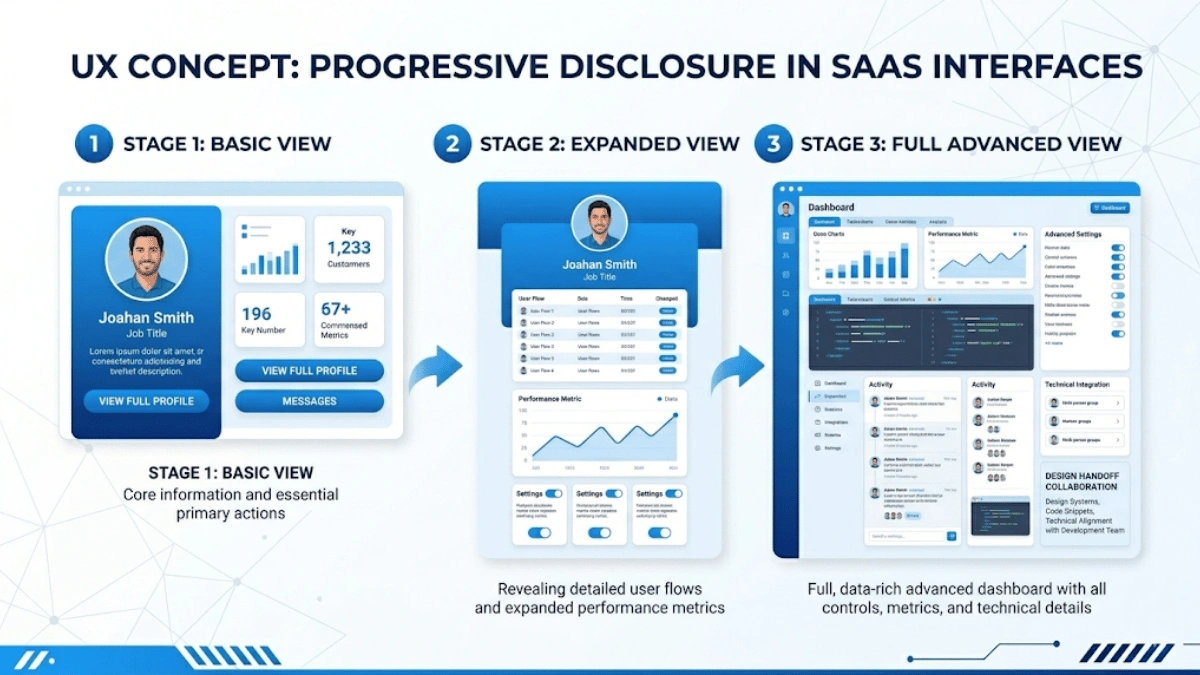
- Progressive Disclosure: Show users only the information and options they need at each step, revealing more advanced features gradually as they become relevant. This reduces cognitive load and prevents the “paralysis by options” effect that drives users away from feature-rich products.
- Smart Defaults: Pre-configure settings and options based on the most common use cases, so users can start working immediately without needing to customize everything first. Advanced users can always adjust defaults later.
- Contextual Help and Tooltips: Provide in-context assistance — tooltips, inline help text, guided walkthroughs — that explains features exactly when and where users need it, rather than relying on external documentation or help centers.
- Feature Prioritization: Apply the 80/20 rule to surface the most frequently used features prominently while tucking less common features into secondary menus or advanced settings. Not every feature deserves prime real estate on the screen.
Simplifying Complicated Workflows
Many SaaS products involve multi-step workflows — setting up a campaign, configuring an integration, completing a compliance review, or processing an order. These workflows can quickly become frustrating if not designed carefully.
Effective approaches include:
- Multi-Step Wizards: Break complex tasks into a series of focused, manageable steps. Each step should have a clear purpose, clear instructions, and a visible progress indicator so users know where they are and how much remains.
- Inline Validation: Validate user inputs in real time as they fill out forms, providing immediate feedback about errors or issues rather than waiting until they submit the entire form. This prevents frustration and reduces error rates.
- Visual Progress Indicators: Show users their progress through multi-step processes with clear visual indicators — progress bars, step counters, or checklists. Knowing how much progress they have made motivates users to complete the workflow.
- Save and Resume: For lengthy workflows, allow users to save their progress and return later. Nothing is more frustrating than losing 20 minutes of work because you had to step away.
- Undo and Recover: Provide clear undo options for destructive actions. Users should feel confident experimenting with your product knowing they can easily reverse any mistakes.
Ensuring Consistency Across a Growing Product
As SaaS products grow — adding new features, expanding to new platforms, and onboarding new team members — maintaining design consistency becomes increasingly challenging. Inconsistency creates confusion, increases the learning curve for users, and makes the product feel unprofessional.
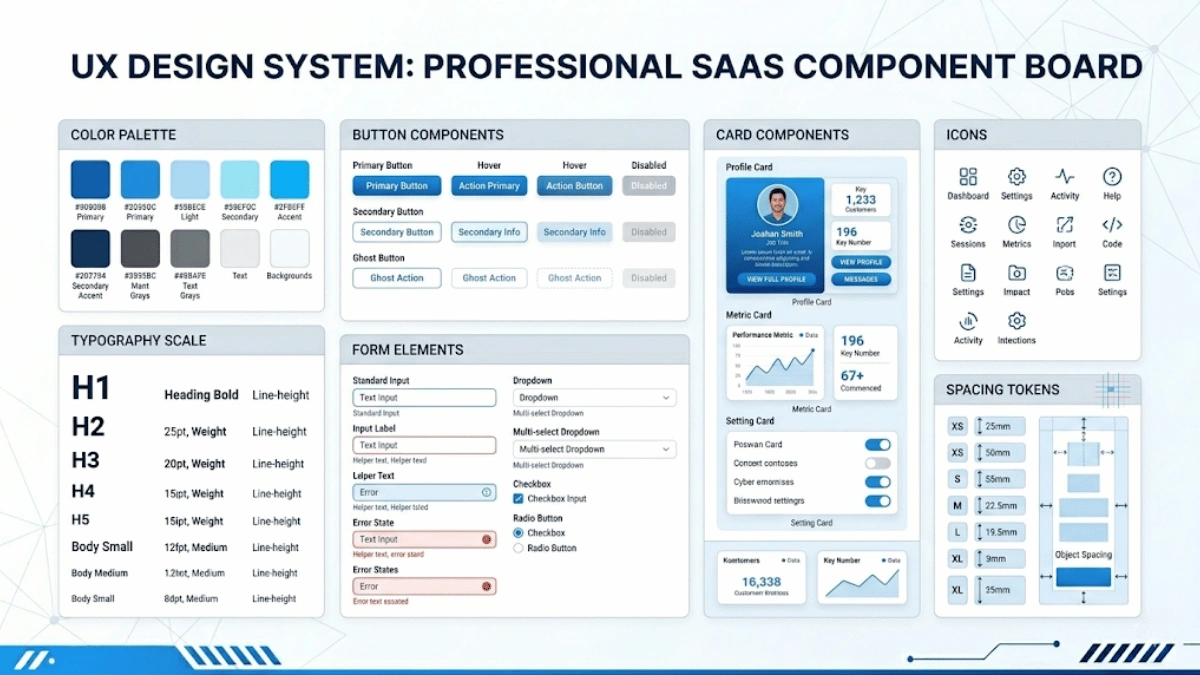
The solution is a comprehensive design system that includes:
- Component Library: A shared library of reusable UI components — buttons, forms, tables, modals, cards, navigation elements — with consistent styling, behavior, and accessibility attributes.
- Design Tokens: Centralized definitions for colors, typography, spacing, shadows, and other visual properties that can be updated globally.
- Pattern Library: Documented solutions for common interaction patterns — how to handle empty states, loading states, error messages, confirmations, and notifications.
- Governance Process: Clear guidelines for when and how to create new components, modify existing ones, or request exceptions to the design system. Without governance, design systems quickly become outdated or fragmented.
Incorporating User Feedback Into the Design Process
SaaS products must continuously evolve based on user feedback. But managing feedback at scale — from thousands of users with diverse needs and conflicting requests — is a significant design challenge.
Best practices include:
- Structured Feedback Channels: Implement multiple feedback mechanisms — in-app feedback widgets, customer support tags, NPS surveys, user interviews, and community forums — and consolidate them into a single, organized system.
- Data-Informed Prioritization: Not all feedback is equal. Use a combination of quantitative data (how many users requested it, what is the business impact) and qualitative data (how important is it to key user segments) to prioritize design improvements.
- Continuous Discovery: Rather than conducting user research only at the beginning of a project, adopt a continuous discovery practice where the team regularly speaks with users, analyzes usage patterns, and identifies emerging needs.
- Iterative Design Sprints: Use short design sprints (one to two weeks) to rapidly prototype, test, and refine solutions for specific user problems before committing to full development.
Is AI Replacing UI/UX Designers?
This is one of the most frequently asked questions in the design industry, and the answer is clear: no, AI is not replacing UI/UX designers. However, it is fundamentally transforming how they work.
AI tools are increasingly being used to augment and accelerate various aspects of the design process:
- Research and Analysis: AI can analyze large volumes of user feedback, survey responses, and usage data far faster than humans, identifying patterns and trends that inform design decisions.
- Automated Testing: AI-powered tools can automatically identify accessibility issues, visual inconsistencies, and common usability problems in designs before they reach users.
- Content Generation: AI assists with generating placeholder content, microcopy variations, and even initial layout explorations, speeding up the early stages of design.
- Predictive Analytics: AI can predict how users are likely to interact with different design options, helping teams make more informed decisions earlier in the process.
However, the strategic, creative, and empathetic aspects of UX design remain uniquely human. Understanding the nuanced emotional needs of users, crafting a coherent product vision, navigating complex business requirements, and making judgment calls about design tradeoffs all require human intelligence, creativity, and empathy that AI cannot replicate.
The most effective design teams in 2026 are those that combine human creativity with AI tools — using AI to handle the analytical and repetitive aspects of design while focusing human energy on strategy, creativity, and empathy.
Measuring the ROI of Your UI/UX Design Investment
One of the most important conversations you should have with your design partner is about how you will measure the success of the engagement. UX design is a business investment, and like any investment, it should deliver measurable returns.
Here are the key metrics you should track to evaluate the impact of your UX design investment:
Task Completion Rate and Time-on-Task
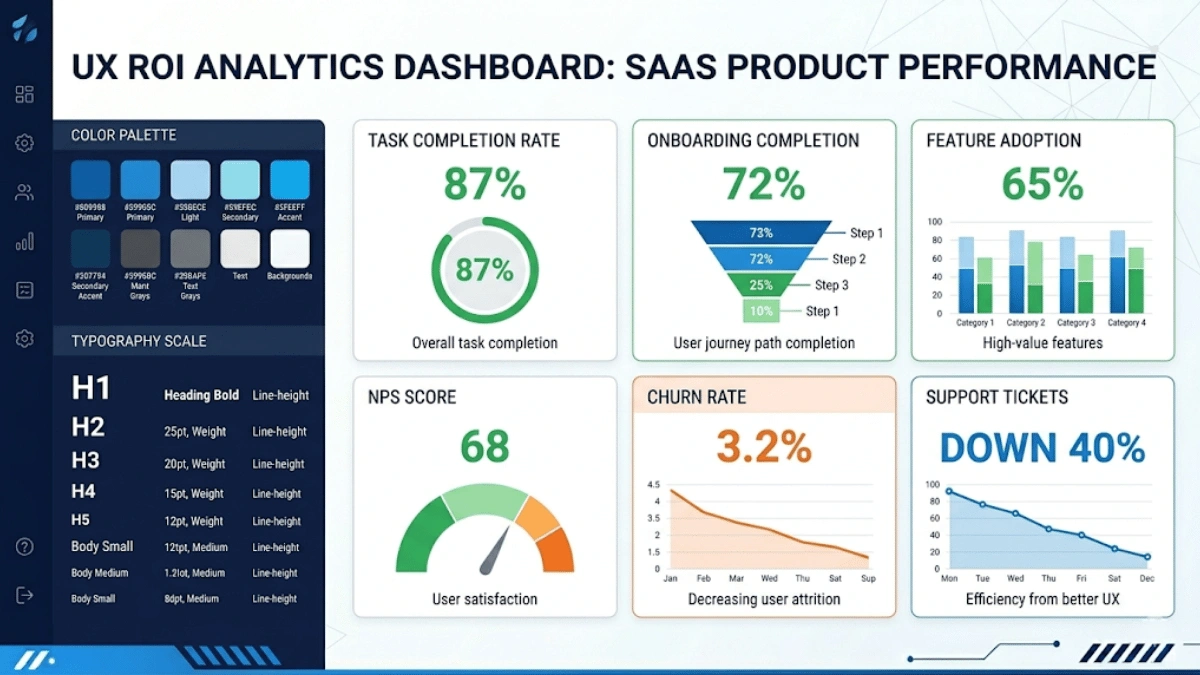
These are fundamental usability metrics that measure how effectively users can accomplish their goals within your product. Task completion rate measures the percentage of users who successfully complete a specific task, while time-on-task measures how long it takes. Improvements in these metrics after a redesign directly indicate that the new design is more usable and efficient. For complex SaaS products, even small improvements in task efficiency can save users significant time over hundreds of interactions, dramatically improving satisfaction and retention.
User Onboarding Completion Rate
This metric tracks what percentage of new users complete your onboarding flow and reach the activation milestone — the point where they first experience the core value of your product. A well-designed onboarding experience should have a completion rate of 60% to 80% or higher. If your rate is significantly lower, it is a strong signal that the onboarding UX needs improvement. Every percentage point improvement in onboarding completion can translate directly into increased revenue from converted trial users.
Feature Adoption Rate
Feature adoption measures how many active users are using specific features of your product. Low adoption of a key feature might indicate a discovery problem (users do not know it exists), a usability problem (users find it too difficult), or a value problem (users do not see the benefit). UX improvements can address the first two issues through better feature visibility, contextual prompts, and simplified interactions.
Net Promoter Score (NPS) and Customer Satisfaction (CSAT)
NPS measures how likely users are to recommend your product on a scale of 0 to 10, while CSAT measures overall satisfaction with specific interactions or the product as a whole. These are lagging indicators that reflect the cumulative impact of your UX on user perception. Tracking them over time after UX improvements helps quantify the broader satisfaction impact.
Churn Rate and Trial-to-Paid Conversion Rate
These are the ultimate business metrics for SaaS companies. Churn rate measures the percentage of customers who cancel their subscriptions in a given period, while trial-to-paid conversion measures the percentage of free trial users who become paying customers. Both are directly influenced by UX quality. Reducing monthly churn by even 1-2% can have a massive compounding effect on annual revenue, and improving trial conversion by a few percentage points can dramatically accelerate growth.
Support Ticket Volume Related to Usability
Tracking the volume and nature of support tickets that relate to usability issues (rather than bugs or feature requests) provides a direct measure of UX quality. After a redesign, you should see a measurable decrease in “how do I” questions, navigation confusion reports, and complaints about difficult workflows. This reduces support costs and frees your support team to focus on higher-value interactions.
When evaluating design partners, ask them which of these metrics they have improved for past clients and by how much. A results-oriented design agency will be comfortable discussing specific metric improvements and should be willing to define success metrics with you at the beginning of the engagement.
The Future of SaaS UX: Trends Shaping Design in 2026 and Beyond
The SaaS UX landscape is evolving rapidly, driven by advances in technology, changing user expectations, and new design paradigms. Understanding these trends will help you choose a forward-thinking design partner and ensure your product remains competitive for years to come.
AI-Powered Personalization and Adaptive Interfaces
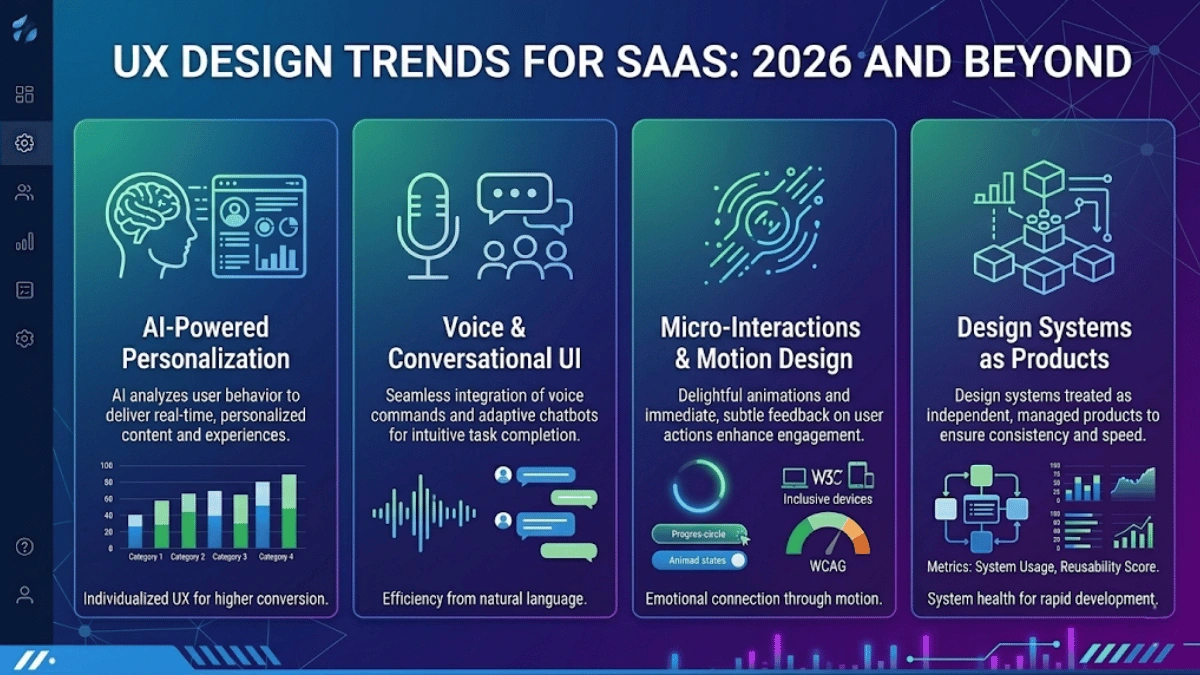
One of the most transformative trends in SaaS UX is the rise of AI-driven personalization. Rather than presenting every user with the same interface, intelligent products are beginning to adapt their layouts, feature visibility, content, and workflows based on individual user behavior, role, and preferences. For example, a project management tool might automatically surface the features a specific user accesses most frequently, rearrange dashboard widgets based on usage patterns, or adjust the complexity of the interface based on the user’s proficiency level. This level of personalization reduces friction and makes products feel tailored to each individual user.
Voice and Conversational UI in SaaS Products
As voice assistants and conversational AI become more sophisticated, SaaS products are beginning to integrate voice commands and chat-based interfaces as complementary interaction methods. Users can ask questions, trigger actions, and navigate products using natural language, which is particularly valuable for mobile contexts or situations where hands-free operation is preferred. While this does not replace traditional GUI-based interfaces, it adds an additional layer of accessibility and convenience that forward-thinking SaaS products are already exploring.
Micro-Interactions and Motion Design for Better Engagement
Micro-interactions — small, purposeful animations that respond to user actions — are becoming increasingly important for creating engaging and delightful SaaS experiences. A subtle animation when a task is completed, a smooth transition between views, a playful loading indicator, or a gentle bounce when a form field is invalid — these small details collectively create a sense of responsiveness and polish that significantly enhances perceived quality. In 2026, motion design is no longer a luxury — it is a baseline expectation for professional SaaS products.
Accessibility-First Design as a Competitive Advantage
Accessibility is moving from a compliance checkbox to a genuine competitive differentiator. Products that are truly accessible — usable by people with visual impairments, motor disabilities, cognitive differences, or temporary situational limitations — serve a broader market and often provide a better experience for all users. Accessible design practices like high contrast ratios, keyboard navigation, screen reader support, and clear content hierarchy benefit everyone, not just users with disabilities. In many markets, accessibility compliance (such as WCAG 2.1 AA or the European Accessibility Act) is also becoming a legal requirement for SaaS products.
Design Systems as a Product (Not Just a Tool)
The most mature SaaS organizations are beginning to treat their design systems as products in their own right — with dedicated teams, roadmaps, versioning, and documentation. This approach ensures that the design system evolves alongside the product, remains relevant and up-to-date, and serves as a powerful enabler for rapid, consistent feature development. Design systems are no longer just internal tools for designers — they are strategic assets that accelerate development, ensure quality, and reduce costs at scale.
Why SaaS Companies Trust DigiOxide for UI/UX Design Services
Throughout this guide, we have outlined exactly what to look for in a UI/UX design partner for your SaaS product. At DigiOxide Technologies Private Limited, we check every box — and then some.
Here is why SaaS companies worldwide trust DigiOxide as their UI/UX design partner:
- 8+ Years of Proven Experience: DigiOxide has over eight years of experience designing and building scalable SaaS platforms, mobile applications, AI-powered solutions, and enterprise software. We have worked with ambitious startups and growing enterprises across the globe, with a particular focus on the US market.
- End-to-End Capabilities: Unlike pure-play design agencies, DigiOxide offers a full spectrum of services from UX research and UI design to custom software development services, web and mobile application development, and ongoing operations support. This means your design and development teams work hand-in-hand under one roof, eliminating handoff friction and ensuring design intent is preserved in the final product.
- Deep SaaS Expertise: We specialize in designing complex SaaS dashboards, multi-tenant platforms, onboarding flows, role-based interfaces, and data-heavy applications. Our designers understand the unique challenges of SaaS and bring specialized knowledge to every engagement.
- Design-Led Development Philosophy: At DigiOxide, design is not an afterthought — it is the foundation. Our design-led development approach ensures that every product we build starts with a deep understanding of the user and is validated through research and testing before a single line of code is written.
- AI-Powered SaaS Development: As a SaaS development company, we create intelligent, multi-tenant platforms with automation, personalization, and advanced analytics designed to scale efficiently and support subscription-driven business models.
- MVP Development and Rapid Prototyping: For early-stage startups, we offer MVP development and rapid prototyping services that help you validate your product idea quickly and cost-effectively, getting you to market faster with a design that is built for growth.
- Global Reach, Personalized Service: We serve clients worldwide with a particular focus on the USA, offering flexible engagement models, transparent communication, and dedicated project teams that feel like an extension of your own organization.
Ready to elevate your SaaS product’s user experience? We would love to learn about your product, your users, and your goals. Book a free UX consultation with DigiOxide today and discover how our UI/UX design services can help you reduce churn, increase conversions, and build a product your users will love.
Conclusion: Make the Right Choice — Your SaaS Users Will Thank You
Choosing the right UI/UX design services for your SaaS product is not a decision to take lightly. The quality of your user experience directly impacts every critical business metric — from user acquisition and activation to engagement, retention, and revenue growth. In a competitive SaaS landscape where features are increasingly commoditized, the products that win are the ones that deliver exceptional user experiences.
To summarize the key takeaways from this guide:
- Understand what UI/UX design services include and why SaaS products require specialized design expertise that goes beyond visual aesthetics.
- Recognize that UX directly impacts business-critical metrics like churn, conversion, CLV, and NPS. Treat UX as a strategic investment, not a cost.
- Evaluate design partners on five key criteria: specialized SaaS experience, rigorous design process, scalability and technical alignment, communication quality, and company-stage fit.
- Expect a structured design process that includes discovery, information architecture, visual design, usability testing, and developer collaboration.
- Address common SaaS UX challenges proactively with proven strategies like progressive disclosure, design systems, and continuous user feedback integration.
- Measure the success of your UX investment with clear metrics and hold your design partner accountable for delivering measurable results.
- Stay ahead of emerging trends like AI-powered personalization, accessibility-first design, and design systems as products to future-proof your SaaS UX.
The right design partner will not just make your product look better — they will make your business stronger. They will help you build a product that users love, that drives sustainable growth, and that stands out in an increasingly crowded market.
Do not settle for generic design services. Choose a partner who understands SaaS, who is driven by research and data, and who is committed to delivering measurable results. Your users — and your bottom line — will thank you for it.
Frequently Asked Questions (FAQs)
What are UI/UX design services?
A: UI/UX design services encompass the complete range of activities involved in creating intuitive, user-friendly digital products. UI (User Interface) design focuses on the visual elements — layouts, colors, typography, icons, and interactive elements that users see and interact with on screen. UX (User Experience) design focuses on the broader experience — understanding user needs through research, defining how the product is structured and how users navigate through it, prototyping and testing solutions, and ensuring that every interaction is smooth, efficient, and satisfying. Together, these services include user research, persona development, journey mapping, information architecture, wireframing, interactive prototyping, visual design, design system creation, usability testing, and UX audits. For SaaS products, these services are essential because they directly influence user adoption, engagement, retention, and ultimately revenue.
What is the 80/20 rule in UX?
A: The 80/20 rule in UX, also known as the Pareto Principle applied to user experience, states that approximately 80% of users interact with only about 20% of a product’s features. This principle has profound implications for UX design: rather than giving equal visual weight and prominence to every feature, smart design prioritizes the critical 20% of features that deliver the most value to the most users. These high-impact features should be the most visible, the most accessible, and the most polished. The remaining 80% of features should still be available and well-designed, but they can be placed in secondary menus, settings panels, or advanced sections where power users can find them without cluttering the core experience for everyone else. Applying the 80/20 rule results in cleaner interfaces, faster onboarding, and higher user satisfaction.
Is UI/UX being replaced by AI?
A: No, UI/UX design is not being replaced by AI. However, AI is significantly transforming the design process by augmenting and accelerating various aspects of the work. AI tools are now being used to analyze large volumes of user feedback and usage data, automatically detect accessibility and usability issues, generate initial layout explorations and content drafts, predict user behavior patterns, and automate repetitive tasks like asset resizing and documentation. These tools make designers more productive and help them make more informed decisions. However, the core of UX design — strategic thinking, creative problem-solving, empathy for users, navigating complex business requirements, and making nuanced design tradeoffs — remains a fundamentally human activity that AI cannot replicate. The most effective approach in 2026 is a collaborative one: human designers leveraging AI tools to enhance their capabilities while focusing their energy on the strategic and creative work that has the greatest impact.
How do you ensure design consistency across a SaaS product?
A: Design consistency across a SaaS product is achieved primarily through the creation and maintenance of a comprehensive design system. A design system is a centralized library that includes reusable UI components (buttons, forms, modals, tables, navigation elements), design tokens (standardized values for colors, typography, spacing, shadows), interaction patterns (how to handle empty states, error messages, loading states, notifications), and detailed usage guidelines. When every designer and developer on the team uses the same design system, new features automatically maintain visual and functional consistency with existing ones. Beyond the tooling, consistency also requires a governance process — clear guidelines for when and how to create new components, modify existing ones, or request exceptions. The most mature organizations treat their design system as a product with its own dedicated team, roadmap, and versioning.
Is UX design a lot of coding?
A: UX design itself does not involve coding. The core activities of UX design — user research, persona development, journey mapping, information architecture, wireframing, prototyping, and usability testing — are all performed without writing code. UX designers use tools like Figma, Sketch, Miro, and UserTesting to conduct their work. However, strong UX designers have a solid understanding of how software is built. They understand the capabilities and limitations of front-end technologies (HTML, CSS, JavaScript, and modern frameworks like React or Flutter), which helps them design solutions that are both user-friendly and technically feasible. This technical awareness enables more productive collaboration with development teams and results in designs that can be implemented accurately and efficiently. Some UX designers choose to learn basic front-end coding to build more realistic prototypes or to bridge the gap between design and development, but this is a bonus skill, not a requirement.
How do you incorporate user feedback into the SaaS design process?
A: Incorporating user feedback into the SaaS design process requires a structured, multi-channel approach. First, you need to establish diverse feedback collection mechanisms, including in-app feedback widgets, customer satisfaction surveys (NPS and CSAT), usability testing sessions, customer support ticket analysis, user interview programs, community forums, and behavioral analytics tools. Second, all feedback should be consolidated into a centralized system where it can be categorized, tagged, and analyzed. Third, feedback must be prioritized using a combination of quantitative signals (how many users are affected, what is the revenue impact) and qualitative signals (how important is this to key user segments, does it align with the product strategy). Fourth, the design team uses short, focused design sprints to rapidly prototype, test, and refine solutions for the highest-priority issues. Finally, the process should be continuous, not episodic — adopting a continuous discovery practice where the team regularly speaks with users, monitors usage patterns, and proactively identifies emerging needs rather than waiting for problems to be reported. This creates a virtuous cycle of improvement that keeps the product aligned with evolving user needs.
